


Publer: Social Media Tools
4.71.01K Reviews
App Specs
- Version
- 2.5.6
- Updated On
- License
- Free
- Downloads
- 1,000,000+
- Developer
- Kalemi
- Categories
- Social
- Platform
- Android, iOS
Screenshots

 Analysis by AppCompare
I judge a social media manager by a practical question: does it help me plan a week of posts without turning every publishing task into a separate chore? Publer: Social Media Tools is a social app from Kalemi Code that brings account management, scheduling and marketing tools into one place. Its appeal is less about replacing the social networks themselves and more about giving people who post regularly a clearer way to organize their work.
Choose by the work you need to do
Before moving accounts into a management app, I’d first decide whether the main problem is planning, publishing or understanding results. If I only post occasionally on one account, the network’s own tools may be enough. If I’m juggling several accounts, building a consistent schedule, or trying to reuse material that still matters, a shared workspace becomes more useful. Publer is aimed at that second kind of routine.
That distinction matters because a scheduler does not automatically make a social presence better. It can reduce the effort of remembering when to post, but I still need to choose appropriate content, check that it suits each audience and respond to people where conversations happen. I see Publer as a planning and publishing aid rather than a substitute for the judgement and attention that social media requires.
Getting Started with Publer
First impressions matter, and Publer makes a good one. The setup is straightforward—after downloading the app, you’re greeted with a clean interface that doesn’t overwhelm you with options. It’s like meeting someone who knows exactly what you need without having to ask. You just connect your social media accounts, and boom, you’re ready to dive in.
Features That Stand Out
Now, let’s talk about what makes Publer tick. The app boasts a suite of features designed to make your life easier:
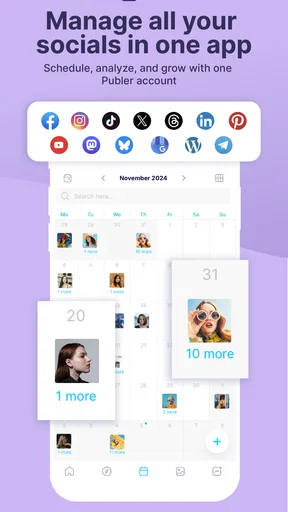
- Multi-Platform Posting: Manage and schedule posts across various platforms like Facebook, Twitter, and LinkedIn all from one place. It’s like having a universal remote for your social media.
- Customizable Scheduling: You can schedule your posts for specific times or let Publer pick the best time based on engagement metrics. It’s like having a social media wizard on speed dial.
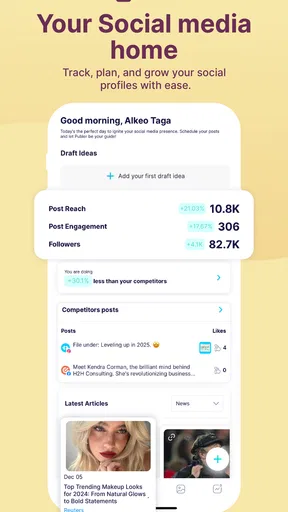
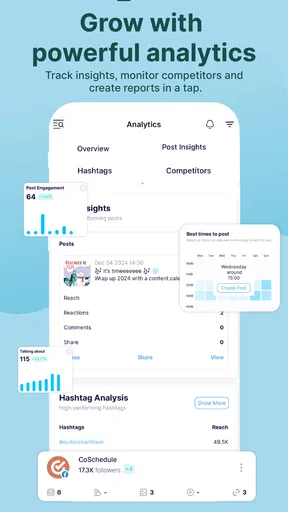
- Analytics: Dive into the numbers with insights that help you understand what’s working and what’s not. It’s not just about vanity metrics; it’s about seeing the bigger picture.
Making a schedule that holds up
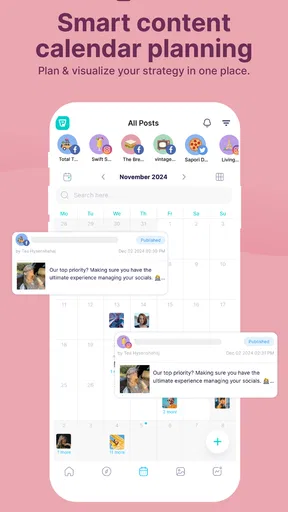
The calendar is most useful when I treat it as an editorial map, not simply a queue of finished posts. I’d sketch out recurring themes first, then fill open spaces with timely updates. That makes it easier to spot a week that is all announcements, for example, or a gap where an audience might expect a regular update. The visual layout helps me assess the rhythm before I spend time polishing each item.
A practical habit is to prepare a post with its intended account and date in mind, then review the calendar as a whole before leaving it to publish. Cross-posting can save time, but identical wording is not always the best choice for every audience. I’d use the shared workflow to keep the core message consistent while checking each version for tone and relevance. That small review step is more valuable than filling every available slot.
Worth Reading Before You Choose

EA SPORTS FC Mobile 26 Is a Bigger Football Game, but It Takes Time

Flipboard Shows What News Apps Must Do Beyond the Feed

Switching to Android Auto Means Rethinking Your Driving Routine

Google Calendar Makes a Crowded Week Easier to Manage

Ludo King Makes the Most of the Minutes Between Plans

Baby Panda World Brings Quick Play to Modern Phones, but Its Game Library Feels Busy
Using Publer on the Daily
What’s it like using Publer day-to-day? Well, it’s kind of like having a personal assistant who’s always on top of things. The drag-and-drop calendar feature is a particular favorite—easy to use and visually intuitive. Need to reschedule a post? Just drag it to a new date. Want to tweak your content? No problem, the edit feature is just a tap away.
One of the neatest features is the ability to recycle evergreen content. Let’s say you have a killer post that always gets engagement. You can set it to repost at intervals, keeping your feed fresh without reinventing the wheel.
A realistic week with multiple accounts
Imagine I help a small local business that posts a weekly offer, a behind-the-scenes update and occasional practical advice. I could draft those items together, place them across the calendar and move one if a real-world change makes the original timing awkward. When a useful advice post remains relevant, recycling it can keep the account active while I work on something new. This is the sort of routine where Publer’s planning tools can save mental effort: the content is not forgotten just because a busy day arrives.
The same routine also shows why scheduling is not a “set and forget” solution. If the offer changes or a planned post no longer fits the moment, I’d revisit the queue rather than allow an outdated message to go out. I would leave room for spontaneous replies and timely posts instead of scheduling every slot. The calendar is strongest as a flexible plan, not a promise that nothing will change.
What the numbers can—and cannot—tell me
Analytics are useful when I compare similar posts and ask a specific question: did a format, topic or posting pattern seem to draw more attention? I would look for repeated signals rather than treating one unusually strong result as a permanent rule. That kind of review can guide the next batch of content without turning every decision into a numbers exercise.
I would also keep expectations grounded. A dashboard can help me see performance, but it cannot explain every reason someone engaged or scrolled past. Audience size, the subject, timing and events outside the app can all affect a result. For a small account, a simple record of what was posted and what seemed to resonate may be more useful than chasing every metric. Publer makes analysis part of the workflow, but interpretation remains my job.
Where Publer fits among other approaches
The usual alternatives fall into two broad groups: each social network’s own publishing tools, and dedicated social management services. Native tools can be a sensible choice if I use only one network or want to work directly where comments and other interactions appear. They avoid adding another planning layer, though they can become awkward when I need to coordinate several accounts from one view.
A dedicated manager such as Publer makes more sense when scheduling across platforms and keeping a shared calendar are recurring needs. The trade-off is that I have to learn another interface and still may need to visit the social apps themselves for parts of daily community work. For someone who wants deep, network-specific control above all else, staying with native tools may feel more direct. For someone who values a central publishing routine, Publer’s combined approach is the stronger fit.
Room for Improvement
While Publer is pretty solid, it’s not without its quirks. The mobile version could be a little more robust. Sometimes, managing from a desktop feels like the smoother option, especially when dealing with bulk actions. It’s not a deal-breaker, but something to keep in mind if you’re always on the go.
Another thing I noticed—while the app supports a good range of platforms, some niche networks might not be on the list. If you’re into platforms outside the mainstream, you might have to look elsewhere or use additional tools.
Getting started without disrupting your routine
Switching to a central scheduler works best when I move over gradually. I’d connect the accounts I actually manage, plan a short stretch of content, and check that the schedule makes sense before relying on it for a full campaign. That gives me a chance to learn the calendar and spot any platform-specific needs without making the change feel like a second job.
I would keep an independent copy of important drafts and campaign notes while settling into any new workflow. The main cost of switching is not just learning buttons; it is rebuilding habits, deciding which account owns each task and remembering where to check for last-minute changes. If the current process is already simple, Publer may add more structure than I need. If missed posts and scattered planning are regular frustrations, that structure can be worthwhile.
Cost, access and who should try it
Publer is free to download, with in-app purchases ranging from $2.99 to $119.99 per item. I’d start by identifying which parts of my workflow I genuinely need before considering a paid option, rather than assuming every available tool will be useful. Someone managing a personal account can keep the routine light; a creator or small team with regular publishing needs may find more value in having a repeatable process. The right choice depends on how much coordination the app replaces.
The app is rated for Everyone and requires Android 7.0 or later. It has a 4.7 average from around 85,000 ratings, with more than one million installs. Version 2.4.2 is the current version. Those figures suggest that it has found a substantial audience, but they do not tell me whether its workflow suits a particular set of accounts, so I’d still judge it by how comfortably it fits my own publishing routine.
Final Thoughts
All in all, Publer: Social Media Tools is a solid choice for anyone looking to streamline their social media game. It’s intuitive, packed with useful features, and priced competitively for the value it provides. Whether you’re a small business owner or just someone looking to organize personal accounts, Publer offers a delightful solution.
So, should you give it a go? If managing multiple social media accounts is part of your daily grind, then I’d say absolutely. It’s like having your very own social media command center right in your pocket. And who wouldn’t want that?
My recommendation
I’d recommend Publer to people who publish across several mainstream social accounts and want one place to plan, reschedule and review their output. It is particularly appealing if evergreen posts are part of your mix or if a visual calendar helps you think clearly. I would not choose it just because I feel I ought to use a management app; occasional posters, people focused on niche networks, and users who prefer to handle everything inside a single social platform may be happier with a simpler or more direct setup.
For me, the best test is a short, ordinary publishing cycle: prepare a few posts, arrange them in the calendar, make one adjustment, and see whether that reduces friction rather than adding it. If it makes the week easier to manage while leaving enough room for timely updates and real conversations, it is doing its job. If I find myself duplicating work between the scheduler and native apps, I’d reconsider which parts of the routine truly need central management.
Pros
- User-friendly interface for easy navigation.
- Supports multiple social media platforms.
- Advanced scheduling options available.
- Collaborative features for team use.
- Detailed analytics for performance tracking.
Cons
- Limited free version features.
- Occasional syncing issues with platforms.
- No integration with some niche networks.
- Learning curve for advanced tools.
- Mobile app lacks some desktop features.
FAQs for Publer: Social Media Tools
What platforms does Publer support for social media management?
Publer supports a variety of social media platforms, including Facebook, Twitter, LinkedIn, Instagram, Pinterest, and Google My Business. This multi-platform support allows users to manage and schedule posts across different networks from a single interface, enhancing efficiency and simplifying social media management tasks.
Is there a free version of Publer available, and what are its limitations?
Publer offers a free version that allows users to manage a limited number of social media accounts. While it includes basic features like post scheduling and analytics, advanced functionalities such as team collaboration and bulk scheduling might be restricted. Reviewing the pricing plans can provide a clear understanding of the available features.
How user-friendly is Publer for beginners?
Publer is designed with an intuitive interface that is user-friendly, even for beginners. The dashboard is straightforward, providing easy access to essential features like scheduling and analytics. Additionally, Publer offers tutorials and customer support to help new users navigate the tool effectively, ensuring a smooth onboarding experience.
Does Publer offer analytics for social media performance tracking?
Yes, Publer provides analytics tools that allow users to track the performance of their social media posts. This includes insights into engagement metrics such as likes, shares, and comments. These analytics help users understand their audience better and refine their social media strategies based on data-driven insights.
Can Publer be used for team collaboration, and how does it facilitate this?
Publer supports team collaboration by allowing multiple users to manage social media accounts together. It offers features like role assignments and content approval workflows, which ensure that posts meet quality standards before publishing. This collaborative environment helps teams coordinate effectively, maintaining a consistent brand voice across all platforms.


